In the rapidly evolving landscape of artificial intelligence, the debate over Udio vs Soundful has become a focal point for creators seeking the ultimate AI music generator. Whether you are a content creator looking for royalty-free background tracks or a songwriter aiming to produce a radio ready hit, choosing between these two industry leaders is a critical decision in 2026.
This comprehensive guide explores the core differences, pricing models, and creative execution paths of Udio vs Soundful to help you determine which platform truly brings your song ideas to life.
Meet Udio and Soundful - Leading the AI Music Revolution
The AI music industry is no longer a futuristic concept; it is a multi billion dollar reality. According to recent market reports, the generative AI music market is projected to reach approximately $1.28 billion by the end of 2026, growing at an impressive CAGR of over 30%. At the forefront of this surge are Udio and Soundful.
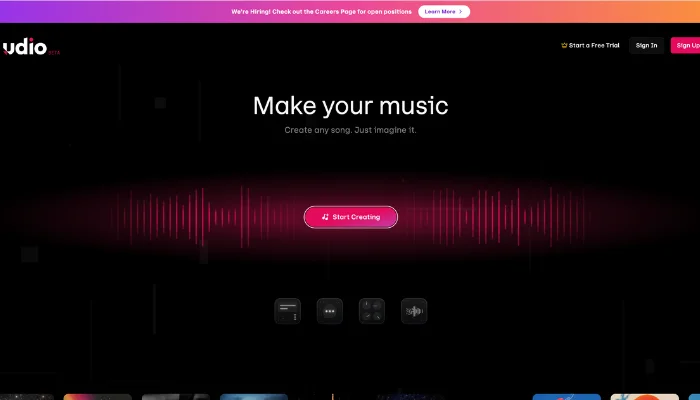
Following its landmark 2025 settlement with major labels, Udio has transitioned into a "collaboration first" powerhouse. It has emerged as a leading option for creators who prioritize studio grade audio fidelity and expressive, high fidelity vocal synthesis. The strength of Udio lies in its ability to handle nuanced prompts that require emotional depth and complex musical textures, frequently earning it acclaim as a highly "musical" tool for generating full length compositions.
Conversely, Soundful is positioned as a premier standard for high volume production and licensing. Designed to empower creators who need unique, studio quality music without the risk of copyright strikes, Soundful provides a hyper efficient environment for generating tracks with high uniqueness scores that are ready for commercial monetization. It is specifically built for those who value speed and consistency in their professional creative workflow.

How Udio and Soundful Differ in AI Music Generation
Assessing these platforms involves analyzing how their distinct technical architectures influence creative control, audio fidelity, or commercial speed across six critical dimensions.
💡 Hands on Test: During our internal testing, we used a specific complex prompt on Udio and successfully generated a 3 minute vocal track in under 10 minutes with stunning studio level clarity. In contrast, Soundful excelled when we needed to batch generate five distinct royalty-free background tracks in less than 3 minutes, proving its superior speed for high volume needs.
User Interface Workflow
- Udio utilizes a "collaboration first" environment focused on nuanced prompt handling. The interface supports building full length compositions through an iterative process of extending specific musical segments.
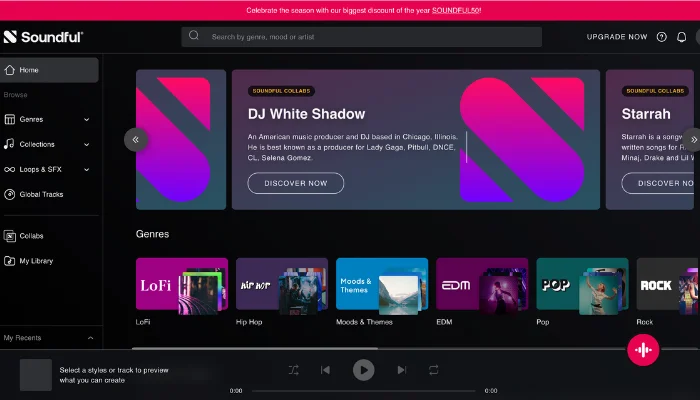
- Soundful provides a production centric layout focused on high volume efficiency. The interface centers on a streamlined selection process where users generate unique tracks ready for immediate commercial deployment.
Customization Flexibility
- Udio offers granular control over melody, harmony, instrumentation, or dynamics. Features like "Inpainting" allow for the surgical modification of specific audio sections without altering the surrounding composition.
- Soundful employs a preset driven generation model based on over 150 "Smart Styles". This logic prioritizes rapid creation, requiring minimal manual adjustment to achieve a professional, balanced sound.
Sound Quality across Genres
- Udio delivers studio grade audio fidelity paired with high fidelity vocal synthesis. The engine specializes in capturing the emotive nuances required for complex genres like Soul, Jazz, or Rock.
- Soundful outputs polished, broadcast ready tracks optimized for diverse digital platforms. The audio processing maintains a consistent, professional mix across all supported genres, emphasizing clarity for background use.
Song Structure Management
- Udio operates through an incremental extension system where tracks grow in segments. This method facilitates the development of long form pieces that maintain thematic coherence throughout the duration.
- Soundful manages progression through energy or mood parameters that dictate the overall flow of a track. The platform allows for the generation of multiple variations from a single template, keeping the core sonic identity stable.
Export Options with Integration
- Udio supports a wide range of export formats, including individual stems or multitrack files. This capability allows for the seamless movement of AI generated assets into Digital Audio Workstations for final mixing.
- Soundful focuses on providing high resolution stereo renders optimized for immediate use. The export process prioritizes speed, delivering files that meet professional standards without further technical intervention.
Intellectual Property Usage
- Udio operates under a partnership driven model following major 2026 agreements with record labels like Merlin, Sony, or Warner. This system supports independent artists looking to release vocal heavy tracks on streaming services within a sanctioned framework.
- Soundful provides a direct "Royalty-Free for Life" guarantee through its unique generation engine. This approach serves commercial creators needing complete legal certainty for monetized content without potential copyright disputes.
Steps to Use Udio and Soundful for AI Music
AI music platforms make it easier to create professional quality tracks while offering varying degrees of control and efficiency. Udio and Soundful provide complementary approaches that allow creators to balance detailed customization with faster music generation.
How to Create a Song with Udio
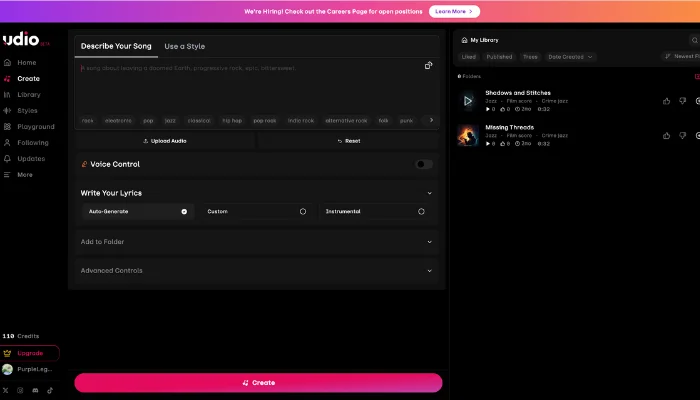
Step 1. Describe Your Song
Outline the concept and mood of your track to guide the AI in understanding your musical vision.
Step 2. Write Lyrics or Use Auto Generate
Choose how lyrics are created. You can enter custom lyrics in the editor, let the system auto generate lyrics based on a short description, or switch to instrumental mode to skip lyrics entirely.
Step 3. Adjust Advanced Controls
Adjust advanced settings like song length, prompt strength, and generation quality to control how the track is generated.
Step 4. Generate and Share
Produce the final song and share it or export it in formats suitable for further production or digital platforms.
How to Create a Song with Soundful
Soundful focuses on rapid, high volume music generation, providing tools to turn ideas into studio-quality tracks efficiently while maintaining royalty-free output.
Step 1. Choose Style and Mood
Select the genre, key, and tempo that match your vision. Use inspiration from favorite artists to guide your choices and generate multiple instrument tracks in the same key for versatility.
Step 2. Bring Lyrics to Life
Input your lyrics and optionally use text to speech tool or record your own voice. Refine the words to ensure they resonate with listeners.
Step 3. Download and Share
Download the generated track, make final adjustments if required, then export and share the finished song across supported platforms.
Pricing Comparison Between Udio and Soundful
Budget is often the deciding factor in the Udio vs Soundful debate. Both offer "freemium" models, but their paid tiers cater to different users.
| Plan Tier | Udio (Monthly & Annual Available) | Soundful (Annual Discount on Pro) |
| Free Plan | 10 daily credits / 100 monthly (no rollovers) | Unlimited generations, 1 MP3 download/mo |
| Standard/Creator | $10/mo: 2400 credits/mo, 2-minute generations | $4.99/mo (billed monthly): 100 downloads/mo, no STEM access |
| Pro Plan | $30/mo: 6000 credits/mo, up to 10 songs at once | $14.99/mo ($119.99 billed annually): Unlimited downloads, 20 STEMS/mo |
| Key Benefit | Best for Songwriting & Vocals | Best for Background Music & Stems |
Note: Pricing is accurate as of January 2026. Udio's new licensed platform (following the UMG/Warner deals) is expected to roll out expanded enterprise tiers later this year.
Bonus: Want to Turn Lyrics into Songs With InsMelo
If Udio feels too complex to master and Soundful feels too focused on background textures, InsMelo offers a powerful middle ground. Specifically designed for lyrics to song simplicity, it prioritizes lyric alignment and vocal clarity over the friction of complex prompting.

It’s the ideal alternative for creators who want to transform written verses into radio ready vocal tracks with rapid production speed. By bridging the gap between professional depth and automated efficiency, InsMelo ensures your song ideas come to life without the technical overhead.
3 Simple Steps to Create with InsMelo
Step 1. Input Your Lyrics
Paste your verses directly into the tool, where lyrics to song analyzes emotional cadence to build a structured song draft in seconds.
Step 2. Select Your Style
Choose from the most diverse selection of genres and pair them with high fidelity AI voice models that match your creative vision.
Step 3. Generate & Share
Simply click "Create" to render your track, use built in tools to polish the output, and export in MP3, WAV, or MP4 formats instantly.
Also read: Make Your Own Kpop Songs in Minutes With AI
Conclusion
In the Udio vs Soundful debate, use Udio for emotional, vocal heavy songs that need a "soul", and Soundful for professional background tracks and granular stem control. For those seeking the most intuitive and seamless path from a written lyric to a finished vocal track, InsMelo AI song generator is the ultimate specialized alternative.