
Want to learn how to make nightcore without getting stuck in complicated audio editing? Nightcore may sound easy at first, but a clean version takes more than simply speeding up a song.
Many beginners struggle when they first try to make nightcore music. The song needs speed, brightness, and clear vocals at the same time, so the final result still feels like music instead of a rough speed edit.
This guide will show you how the Nightcore sound works and how to create a polished Nightcore-style song in a simpler way. Learning how to make a nightcore song becomes easier once you understand the basic formula behind the style.
What Is Nightcore Music?
Nightcore music is a remix style that makes a song faster, brighter, and higher in pitch. It gives the original track a more energetic and emotional sound, often making the vocal feel lighter and the melody feel more intense.
The style started in the early 2000s with sped-up trance and Eurodance edits. Today, Nightcore is known for its quick tempo, raised vocals, and strong emotional mood. Its charm comes from the way speed and pitch work together, creating a version that feels familiar but more exciting.
Key Features of a Good Nightcore Track
- It is not just a song played faster.
- Speed and pitch rise together.
- The vocal still sounds clear, not thin or squeaky.
- Music keeps its balance after the tempo changes.
How to Make a Song Nightcore: The Basic Formula
If you want to learn how to make a song nightcore, the basic formula is simple, increase the tempo and raise the pitch together. This creates the classic bright, fast, and high-energy sound that defines Nightcore.
A common starting point is to speed up the song by about 20% to 35%. Many creators begin around 1.25x because it adds enough energy without making the track feel too rushed.
The pitch usually rises by about 3 to 5 semitones, depending on the original vocal and melody.
Basic Nightcore Settings
- Speed - around 1.2x to 1.35x
- Pitch - around +3 to +5 semitones
- Tempo - often around 160 to 180 BPM
- Vocal - clear, bright, and natural
- Mood - energetic, emotional, and fast-moving
To make song Nightcore in the traditional way, the speed and pitch should rise together instead of being adjusted separately.
The most important part is balance. If the speed is too high, the rhythm can feel messy. If the pitch is pushed too far, the vocal can sound thin or unnatural. A clean Nightcore version should feel lifted, not broken.
How to Make Nightcore Songs with InsMelo
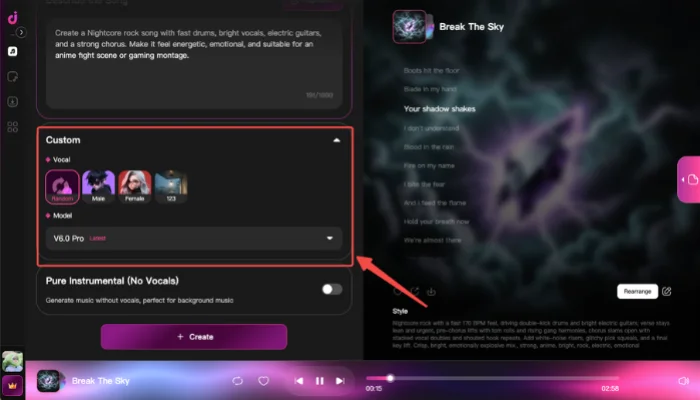
InsMelo AI Music Generator makes Nightcore creation easier for beginners who want a fast and clean result. The workflow focuses on the sound you want instead of complex production settings, so the process feels more direct and easier to control.

InsMelo also works as a nightcore song maker for creators who want to build the sound from an original idea instead of only editing an existing file.With the right direction, you can create a Nightcore-style song that sounds energetic and polished while keeping the vocal clear and the melody natural.
Creators who want to make nightcore songs online can follow the steps below to build that sound from a simple idea.

Nightcore Prompt Examples You Can Copy
Once you understand the basic Nightcore sound, the next step is turning that idea into a clear prompt. The examples below can help you start faster and adjust the style in your own way.
- Pop Nightcore Prompt:
Create a fast Nightcore pop song with bright female vocals, emotional melodies, sparkling synths, and an energetic chorus. Make the track feel catchy, youthful, and ready for a short video edit.
- Anime Nightcore Prompt:
Create a Nightcore song with a fast tempo, raised vocals, dramatic chords, and an anime opening mood. The track should feel emotional, exciting, and full of forward motion.
- EDM Nightcore Prompt:
Create a high-energy Nightcore EDM track with bright synth leads, quick drums, raised vocals, and a powerful drop. Make the sound clean, intense, and suitable for a high-speed visual edit.
- Sad Nightcore Prompt:
Create an emotional Nightcore song with fast rhythm, clear high vocals, soft piano, and a bittersweet melody. Keep the mood sad but energetic, like a late-night memory moving at high speed.

- Rock Nightcore Prompt:
Create a Nightcore rock song with fast drums, bright vocals, electric guitars, and a strong chorus. Make it feel energetic, emotional, and suitable for an anime fight scene or gaming montage.
Tips to Make Better Nightcore Music
After trying a few prompts, small changes can make the final song sound cleaner and more natural. These tips will help you refine the track before you download or share it.
- Keep prompt focused: A clear idea helps the AI create a more balanced Nightcore track.
- Use bright vocal direction: Nightcore works best when the vocal feels lifted but still natural.
- Control the speed: Too much speed can make the song feel rushed instead of energetic.
- Choose a strong mood: A clear emotion makes the track more memorable.
- Refine one detail at a time: Small prompt changes make it easier to improve the result.
Learning how to make Nightcore music starts with keeping the final version clean. A faster track only works when the vocal, melody, and rhythm still feel connected.

FAQ About Making Nightcore Songs
Conclusion
Learning how to make nightcore is easier once you understand how speed and pitch shape the sound. Traditional editing gives you more manual control, but it can take time to keep the vocal clear and the track balanced.
If you want to make nightcore music online, InsMelo gives you a simpler way to create, refine, and download a Nightcore-style song from your own idea. Try InsMelo Nightcore Maker today and turn your sound into a fast, clean track in minutes.
Ready to make your own Nightcore? Start with one clear idea, create a first version, then refine it until the song fits your style.