Your cat already has the attitude. Give it a soundtrack and a few dance moves. This guide covers how to make AI cat dancing video using your own photo, music, and creative direction in InsMelo AI. Start with a simple movement, preview the result, and build a clip that keeps your pet's personality in focus.
What You Need Before Making an AI Cat Dance Video
You do not need to film your cat performing tricks or build an animation from scratch. To make your cat dance with AI, start with a performance that suits your pet's appearance and personality. Keep your first attempt short and focused.
- Clear cat photo: Choose one cat against an uncluttered background. Keep the paws and tail visible for a full-body routine, with space around the subject.
- Suitable music clip: Pick a passage with a steady beat and a strong opening. Trim any long silence before uploading.
- Simple dance idea: Choose gentle swaying or a small paw gesture. Match the movement to the pose and framing in your photo.
APPA's 2026 Cat Report found that 53 million U.S. households owned a cat in 2025. Give your video a personal touch by keeping your pet's distinctive markings and familiar expression at the center of the performance. Before starting your make cat dance AI free, prepare these materials and check the credits available in your InsMelo account.
How to Make AI Cat Dancing Video With InsMelo AI Cat Dance Video Generator
Ready to learn how to make cat dance AI videos with your own photo? Give your pet a starring role in a personalized musical performance, with its familiar expression and personality at the center.
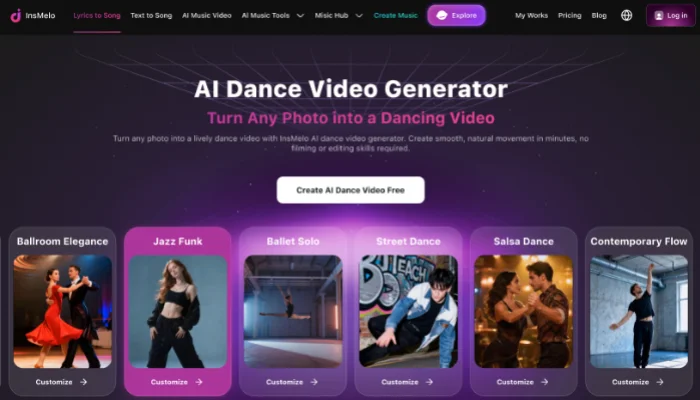
InsMelo AI cat dance video generator brings your pet's personality into a musical performance. From a playful kitten to a famously serious tabby, your cat becomes the focus of a personalized video with music and creative direction.
How to make AI Cat Dance

Cat Dance Prompt Examples You Can Try
Explore how to make dancing cat AI video with the prompts below. Choose a performance that fits your photo, describe the features you want to preserve, and adjust one detail at a time.
Cute Paw Dance
Use a seated cat photo with both front paws visible.
Animate the cat in the uploaded photo with gentle alternating front-paw lifts and a slight head sway. Keep its seated position, facial features, and fur markings consistent. Soft indoor lighting, fixed camera, small movements, and a brief pause at the end.
Playful Hip-Hop Cat
Choose a full-body photo with space on both sides of the subject.
The cat in the uploaded photo performs a relaxed side-step dance with a gentle body bounce and one small head nod. Preserve its face, coat pattern, paws, and tail. Keep the full body centered against the original background. Moderate speed, stable camera, no jumps or spins.
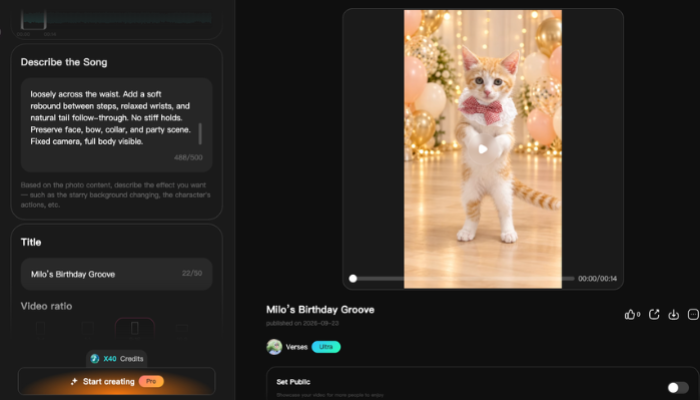
Birthday Party Cat
Pair this scene with a cheerful birthday track and a clearly framed cat photo.
The cat in the uploaded photo gently sways and raises one front paw in a birthday party setting. Keep its recognizable face, fur color, and body proportions. Place soft party lights and balloons behind the cat. Fixed camera, subtle movement, and a relaxed final pose.
To make your cat dance with AI, test the movement before adding elaborate scenery. Keep the strongest version of your prompt and change one detail for the next attempt.
Why Does My AI Cat Dance Video Look Unnatural?
An awkward result can come from the photo, the movement request, or conflicting scene instructions. Review the clip from beginning to end and locate the first visible problem. Make one targeted adjustment before generating it again.
- Distorted paws or legs: Switch to a photo with unobstructed limbs. Remove fast turns, jumps, and crossing steps from the description.
- Changing facial features or fur: Use a sharper reference photo and reduce the requested movement. Remove costume changes or character transformations.
- The cat moves outside the frame: Choose a wider image or request movement in place. Keep the camera fixed instead of combining zooms with sideways motion.
- Stiff or awkward movement: Match the action to the starting pose. Try small paw lifts for a seated cat instead of a full-body routine.
- Movement that clashes with the music: Try a steadier audio passage or adjust the requested movement speed. Review each version with sound.
Refining the result is part of learning how to make cat AI dance. Compare each revision with the previous clip, keeping the photo and music unchanged while testing a new movement description.
Bonus: Create Original Music for Your Cat Dance Video
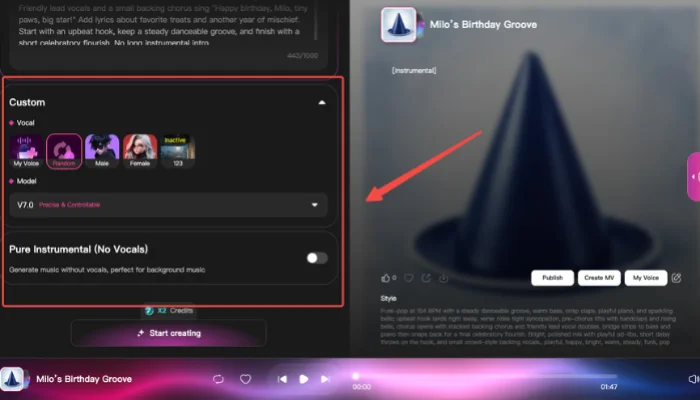
Give your cat a musical theme of its own with InsMelo AI Music Generator. Turn a short description or your own lyrics into a song, with a musical style and mood that suit your pet's personality.
APPA's 2025 Dog & Cat Report found that 21% of cat owners hosted holiday or birthday parties for their cats in 2024. Create a personalized soundtrack for the occasion with your cat's name and a playful chorus, then use it in your dance video. Source: APPA
FAQs About AI Cat Dancing Videos
Conclusion
Learning how to make AI cat dancing video starts with a clear photo, a suitable soundtrack, and a simple dance idea. With InsMelo AI cat dance video generator, you can bring these elements together and refine the performance through your creative description.
Make your cat dance AI video feel personal with a favorite photo, music that suits its personality, and a playful movement.