AI music is transforming the way creators make songs, and Google Gemini Lyria 3 puts this power directly at your fingertips. With Lyria 3, you can quickly turn text, images, or video prompts into short, expressive music clips, complete with melodies, rhythms, and even lyrics. It is designed for creators of all levels who want to explore AI-generated songs efficiently.
In this guide, you’ll learn how to start creating songs with Lyria 3, understand its key features, and discover tips to improve your AI music results. By the end, you’ll have a clear understanding of how to use Gemini Lyria 3 to bring your musical ideas to life.
What is Gemini Lyria 3
Gemini Lyria 3 is Google DeepMind's flagship generative music model, officially integrated into the Gemini 3 ecosystem in February 2026. This advanced iteration moves beyond experimental AI by utilizing a latent diffusion architecture to synthesize studio-quality, 48kHz stereo audio.
Unlike previous models, the 2026 release features integrated SynthID watermarking and natively supports high-fidelity vocal generation in multiple languages. It functions as a sophisticated intelligence layer that maintains structural coherence across complex musical frequencies.
What You Can Create with Lyria 3
Gemini Lyria 3 provides a versatile toolkit for digital creators, social media managers, and musicians. Its multimodal interface allows you to transform diverse inputs into professional audio assets.
Current creative applications include:
- Social Media Soundtracks: Generate unique, 30-second background tracks for TikTok, Reels, or YouTube Shorts.
- Multilingual Vocal Demos: Create short song snippets with high-fidelity vocals in languages such as English, Spanish, and Arabic.
- Visual-to-Audio Scoring: Upload images or short video clips to generate matching cinematic soundscapes or thematic melodies.
- Rapid Prototyping: Experiment with different song structures, such as chord progressions or rhythmic riffs, to jumpstart your creative process.
How to Create a Song with Gemini Lyria 3
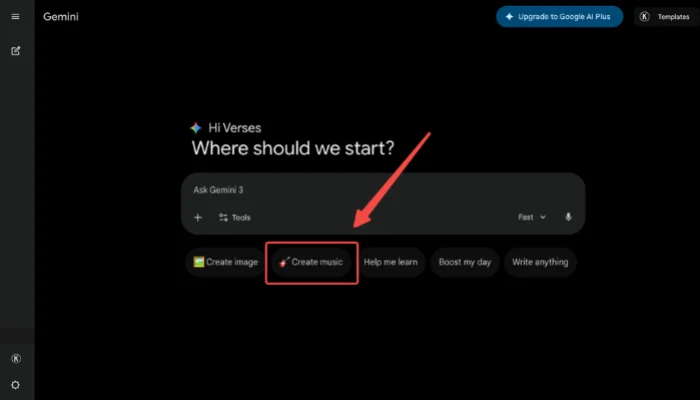
Creating music with Gemini Lyria 3 is intuitive and flexible, allowing you to turn both text prompts and images into short, expressive tracks. In the following steps, we’ll walk through the process so you can quickly start composing your own music and experiment with different styles, moods, and instruments.


Pro Tips: Insights from Our Real-World Testing
During our deep-dive testing of the February 2026 rollout, our team identified specific ways to maximize the model's output quality:
Genre Optimization: Lyria 3 excels at Lo-fi and cinematic ambient styles. Our tests show that these genres maintain much higher clarity and "breathable" textures than dense, high-energy EDM tracks.
The Image Prompt Advantage: Using an image as a primary prompt often yields more "harmonically rich" results. For example, a sunset photo paired with a "calm" text prompt creates deeper piano layers than text alone.
Precise BPM Control: Always include a specific tempo (e.g., "90 BPM") in your prompt. This simple technical addition ensures the generated rhythm aligns perfectly with your video editing pacing.
Get Better AI Songs with Effective Lyria 3 Prompts
To get professional-grade results, use clear and descriptive prompts instead of generic ideas. Combining mood, style, and instrumentation ensures more expressive music.
💡 The Perfect Lyria 3 Prompt Formula
[Genre] + [Main Instruments] + [Vocal Style/Language] + [Mood] + [BPM]
Example: "Japanese City Pop with funky bass and female vocals, nostalgic mood, 110 BPM."
Ready-to-Use Prompt Examples
Lo-Fi Chill: A calm lo-fi track with soft piano and light drums, slow tempo, nostalgic mood.
Upbeat Pop: An energetic pop song with bright synths, catchy melody, and fast tempo.
Cinematic Drama: A cinematic orchestral piece with strings and brass, dramatic and emotional.
Ambient Relaxation: A chill ambient soundscape with soft pads and minimal rhythm.
Electronic Energy: An upbeat electronic track with strong bass and rhythmic drums.
Bonus: Create Song Instantly with InsMelo AI Music Generator
While Gemini Lyria 3 is great for generating short 30-second musical ideas, InsMelo AI Music Generator offers a faster way to turn those ideas into full-length songs. If your project requires tracks longer than 30 seconds or specific vocal control, InsMelo provides the necessary tools to expand your creative workflow.
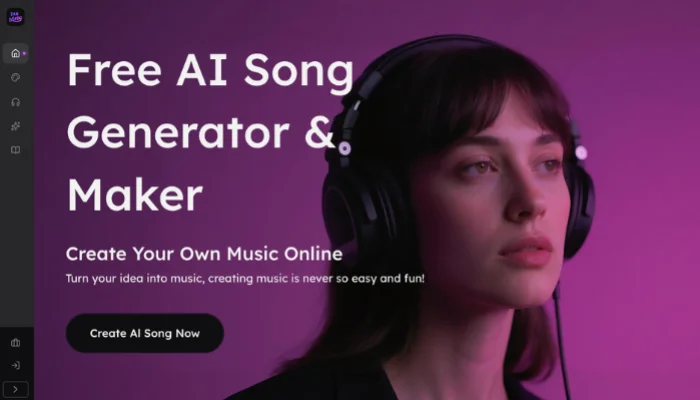
Step 1. Choose your creation method by entering a text description, pasting full lyrics, or uploading an image to begin the process.
Step 2. Select the specific genre, mood, and vocal style, then adjust the rhythmic settings to match your musical vision.
Step 3. Click generate to preview the results, then download your finished track once you feel satisfied with the output.
FAQs About Gemini Lyria 3
Conclusion
Google Gemini Lyria 3 lowers the barrier to music creation by transforming text, images, or videos into short, expressive tracks. This technology helps creators experiment with styles and ideas rapidly to achieve high-resolution results.
For those ready to move beyond short clips or simple AI vocals, explore professional platforms like InsMelo to expand this creative workflow. Use InsMelo lyrics to song feature to turn full-length text into complete melodies, or apply AI voice changer to refine textures and achieve a specific sonic identity.