Want to learn how to make a jingle without hiring a studio or music producer? With InsMelo AI, you can turn a short idea into a catchy audio clip in minutes. This guide covers the usual production process, a faster AI method, and ready-to-use prompts for beginners.
What Is a Jingle?
Jingle is a short piece of music with a simple message, memorable melody, and clear rhythm. It usually combines easy words with a tune that listeners can recognize after hearing it only a few times. Instead of asking people to remember a plain sentence, a jingle gives the message a musical shape that feels familiar.
This is why music is so powerful in branding. A study by Leicester University found that brands with music that fit their identity were 96% more likely to be remembered than brands with no music or poorly matched music.
How Jingles Are Usually Made
Traditional jingle production usually starts with one clear message, then turns it into a short lyric, melody, recording, and final audio file. This approach gives you more creative control and a polished custom sound, but it often takes more time, budget, and music skills if you want to make a jingle quickly.
The usual production process looks like this:
- Choose the main message.
- Write a short slogan or lyric.
- Pick a mood and music style.
- Build a simple melody.
- Record vocals or instruments.
- Edit and export the final track.
Traditional production is still a good choice when you need a fully custom result. But if you are searching for how to make jingle song ideas for a shorter project, the next step is finding a faster way to turn one message into music.
How to Make a Jingle Faster with InsMelo AI
InsMelo AI Jingle Maker makes jingle creation faster and easier. You can create a jingle with AI by entering lyrics or a short text description of the sound you want. The tool then generates high-quality audio in seconds, making it a simple choice for users who want to create a jingle with AI free without music production skills.
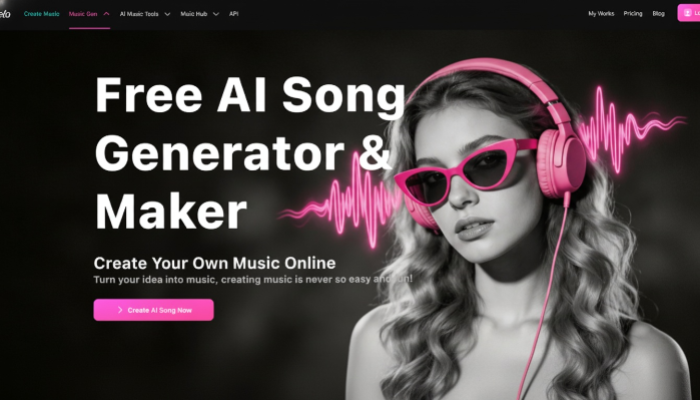
Next, here is how to turn your idea into a jingle with InsMelo step by step.
Method 1: Create a Jingle with Lyrics to Song
Lyrics to song is the most popular way to turn your written jingle idea into music. It works best when you already know the words you want to use.
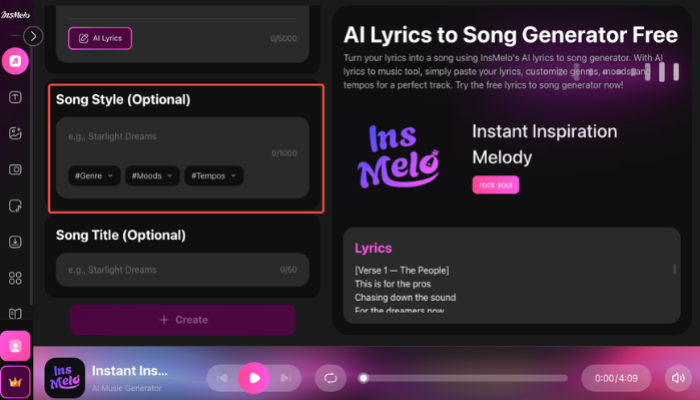
Method 2: Create a Jingle with Text to Song
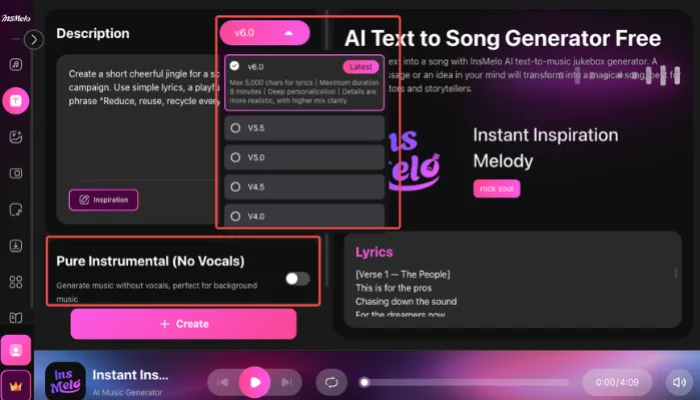
Text to song is the best choice for beginners and music lovers who do not have lyrics yet. You can describe the jingle you want, and InsMelo will turn your idea into music.

Jingle Prompt Examples You Can Copy
Before using the examples below, think of your prompt as a short creative instruction for InsMelo AI Music Generator. Write it in plain language, and keep the request focused on one main idea.
Brand jingle prompt:
Create a 10-second upbeat pop jingle for a coffee shop named Sunny Brew. Include the line “Start your morning bright.” Make the sound warm, friendly, and easy to remember.
Radio jingle prompt:
Create a 15-second energetic radio jingle for a local pizza restaurant named Bella Slice. Use a fun melody and end with the line “Bella Slice, hot and fresh tonight.”
School jingle prompt:
Create a short cheerful jingle for a school recycling campaign. Use simple lyrics, a playful melody, and the phrase “Reduce, reuse, recycle every day.”
Podcast intro prompt:
Create an 8-second intro jingle for a business podcast called Market Minutes. Make it modern, clean, and confident, with a short musical hook.
Social media prompt:
Create a fast 6-second jingle for a skincare product video. Make it bright, fresh, and catchy for short-form video content.
If your goal is to make my own jingle free, test two or three versions of the same prompt. Change one detail each time, then compare the results.
Tips to Make Your Own Jingle Catchy
After you generate a few versions, the next step is choosing the one that feels the most memorable. To make your own jingle catchy, focus on a few simple details before you finalize it:
- Start with one message: Do not try to include every detail in a short jingle.
- Use simple words: A short phrase with rhythm is often stronger than several long lines.
- Repeat the most important words: Repetition helps the melody connect with the message.
- Keep the length tight: Many jingles work well between 5 and 30 seconds, while a short brand sound may only need 3 to 6 seconds.

Jingle Ideas for Different Projects
After learning how to make the song, the next step is deciding where to use it. Once you know how to make a jingle online, you can match each version to one clear purpose.
Radio Jingles
Radio jingles can give short ads a recognizable sound, which is why many users look for create a radio jingle online free tools.
Creator Intros
Creator intros can use a short jingle at the beginning of each video or episode to build a consistent audio identity.
Business Jingles
Business jingles can make campaigns, product videos, and branded content sound more polished and easier to recognize.
School Jingles
School jingles can add a fun audio element to class projects, making this a useful option for anyone searching how to make a jingle for school.
Social Media Clips
Social media clips can use quick jingles to make short videos feel more catchy, branded, and complete.

FAQ About Making a Jingle
Conclusion
Learning how to make a jingle is much easier when you start with one clear idea and choose the right creation method. Traditional production gives you more custom control, while InsMelo helps you turn lyrics or text prompts into music much faster.
If you want to make your own jingle online, InsMelo gives you a simple way to create, refine, and download a version that fits your project. Try InsMelo AI Jingle Maker today and turn your idea into a catchy jingle in minutes.