Beatboxing used to take years of practice to sound tight. The AI beatbox generator now turns a short text prompt into a finished beat in seconds. No mic, no vocal training, no studio booth required.

This guide covers how the technology works, how to generate a track step by step with InsMelo AI Music Generator, and how to write prompts that actually sound like a real beatboxer instead of a generic loop.
What Is an AI Beatbox Generator?
An AI beatbox generator reads a text description or a set of vocal-percussion cues, then builds a rhythm track around them. A beatbox generator picks up on rhythm and phrasing in the words themselves, not just preset patterns, so the output feels human rather than robotic.
AI-generated music is becoming harder to identify in blind listening tests. A 2025 Deezer/Ipsos survey of 9,000 adults across eight countries asked participants to judge three tracks: two fully AI-generated songs and one human-made song. Deezer reported that 97% of respondents did not identify all three correctly. The survey focused on AI-generated music overall, not beatbox tools specifically, so it is best read as industry context rather than proof that AI beatbox outputs always sound human.
How to Make a Beatbox with InsMelo AI
If you want to know how to make a beatbox without years of vocal training, InsMelo's beatbox maker skips all of that. Instead of practicing mouth sounds, you describe the beat you want in plain words, and the AI builds the rhythm, timing, and texture around your description.
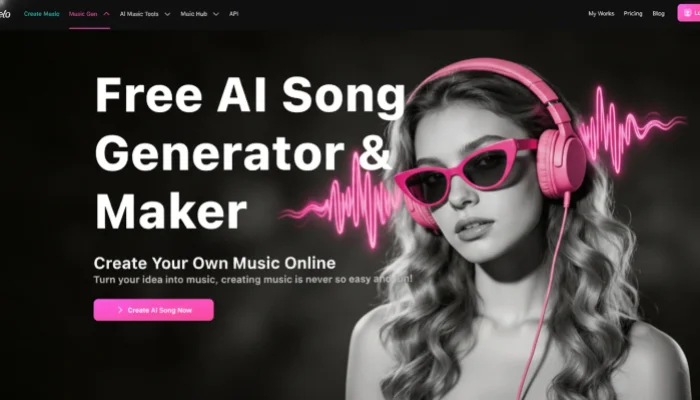
Start From an Idea? Use Text to Song
Follow these steps to build a beatbox from scratch using InsMelo's Text to Song mode.
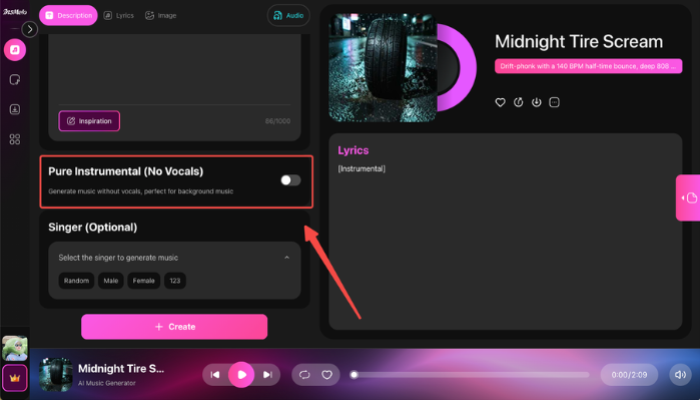

Swap one or two words at a time and regenerate. Small changes in a beatbox generator prompt shift the groove more than most users expect on the first try.
Already Have Lyrics? Use Lyrics to Song Instead
The Description tab works from a plain idea, but it isn't the only path. If a chant, hook, or set of written bars already exists to beatbox over, switching modes turns that into a full vocal track instead of a beat-only loop.
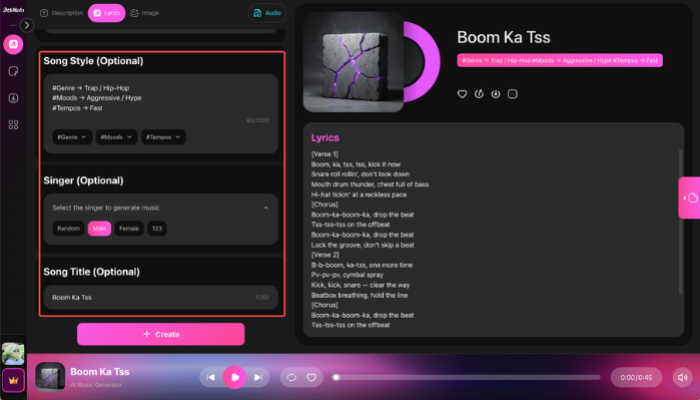
This path suits anyone who already writes hooks or verses and wants the beat built to match the words, rather than starting from a mood description and adding lyrics later.
Why Choose InsMelo as Your Beatbox Maker
A beat is only as good as the tool behind it, and most quick web-based options generate a single loop and stop there. InsMelo AI Music Generator stands out among beatbox maker because it treats a beatbox as the starting point of a real track, not just a standalone novelty clip, with the export options, licensing, and remix tools to back that up.
- Text-first workflow: Most beatbox music maker apps require a recorded sample first. InsMelo skips that step and builds directly from words, so a phone and a blank text box are enough to start.
- Beatbox maker free tier: New users get free generations to test prompts before choosing a paid plan for longer or unlimited tracks.
- Commercial-use rights on paid plans: InsMelo paid plans include commercial-use rights under InsMelo's terms, so users can review the license before using generated tracks in monetized videos, streams, or client projects.
- Built for remixing: Beatbox song maker result can be layered with vocals or instrumentals from InsMelo AI Song Remixer, turning a single beat into a full track.

Tips to Create Better Beatbox Tracks
The same InsMelo model can produce a lazy loop or a track that actually slaps, and the difference almost always comes down to how the prompt is written rather than anything toggled in the interface. A few practical habits make that gap smaller every time:
- Write out the actual sounds instead of a genre name.
Music maker beatbox prompt like "kick, kick, snare, hi-hat roll, vocal scratch" beats a generic label like "hip-hop beat."
- Layer texture words on top of rhythm words.
Terms such as "gritty," "muffled," or "bright" push different beatbox generators toward distinct tonal color, even with the same rhythm pattern.
- Keep tempo language concrete.
"130 BPM" guides the model far more reliably than "fast."
- Reference a genre alongside the sound cues, not instead of them.
"Drift phonk, cowbell, distorted 808, aggressive" gives more direction than either the genre name or the sound list alone.
- Save the prompts that work.
A short library of tested phrases turns a beat box music maker into a repeatable workflow instead of a one-off experiment, especially for creators who need new audio every week.
FAQ About AI Beatbox
Conclusion
Learning how to make a beatbox is much easier in 2026, InsMelo AI Music Generator helps creators turn simple prompts into beatbox music.
Anyone still wondering how to make a beatbox has a faster, more accessible path available today than beatboxers who spent years training their mouths ever had.
Ready to build your own track? Open InsMelo AI Beatbox Generator and generate your first beatbox now.