From classic street battles to today's viral feuds, the art of the lyrical takedown has entered a bold era of digital warfare. In 2026, dropping a fire response no longer requires expensive studio time or years of underground experience. Thanks to sophisticated generative music technology, anyone with a clever comeback can now record a professional response that commands global attention.
This guide shows you how to make a diss track by turning your ideas into a full song using easy-to-use AI tools. With these platforms, you can defend your reputation or spark a viral trend through a creative process that is faster, simpler, and more accessible than ever.
What is a Diss Track
A diss track is a musical attack designed to challenge an opponent or expose their flaws through song. Rooted in 1980s hip-hop culture, the genre has grown into a mainstream way for creators, influencers, and artists to settle scores publicly.
Today, a successful diss track requires more than just sharp insults; it combines clever wordplay with a beat that demands attention. In 2026, the standard has shifted toward high-end production, blending professional-grade sound with a clear, unfiltered message. This evolution means the impact of your lyrics depends as much on recording quality as it does on the strength of your verses.
How to Make a Diss track With InsMelo
For those searching for a reliable diss track maker that balances ease of use with professional output, InsMelo stands out as the primary solution. It handles the complex production layers automatically, allowing you to focus entirely on your creative direction without getting bogged down in technical hurdles.
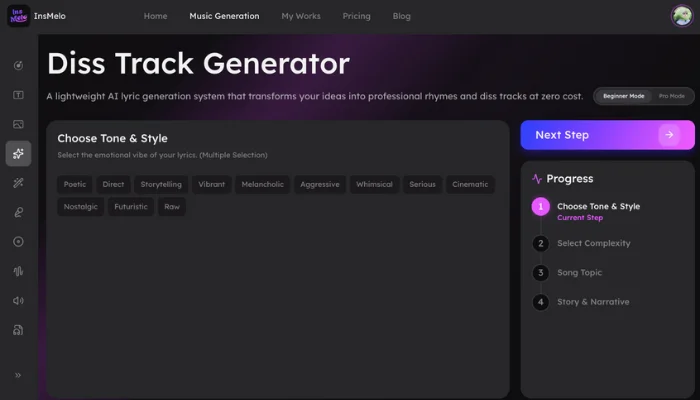
InsMelo streamlines the transition from raw ideas to structured bars by utilizing advanced rhythmic logic. It provides a robust technical foundation that ensures your message maintains high-impact delivery and professional polish, making it the go-to tool for dominating any lyrical confrontation.
How to Make a Diss Track Lyrics
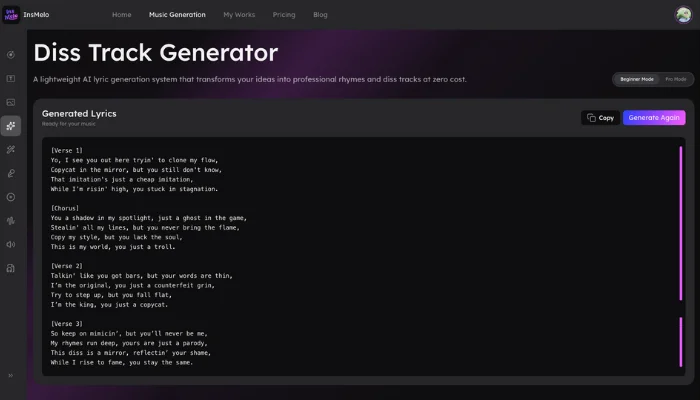

Expert Tip: In our 2026 stress tests, we found that setting song complexity to "High" is the secret to a viral-grade diss. It upgrades the AI from simple rhymes to sophisticated multi-syllabic schemes and internal assonance, increasing wordplay density by 40%. For a track that truly stings, use this setting to trigger deep-cut metaphors and surgical punchlines that "Medium" complexity simply can't match.

Pro Secrets to Making a Diss Track
To dominate the charts in 2026, a diss track needs more than just insults, it requires tactical execution. Based on our analysis of top-performing battle tracks, these professional strategies will help your bars hit harder:
- Prioritize Viral Snippets: When learning how to make a diss track on someone, focus on 4-bar loops optimized for TikTok; this ensures your "drop" is instantly shareable and meme-ready.
- Weaponize Specific Facts: Input precise dates or quotes into the diss track maker to trigger Double Entendres and authentic wordplay that generic roasts can't match.
- Optimize BPM and Flow: If you wonder how do you make a diss track that hits, use 140+ BPM for aggressive Drill or 90 BPM to let your multi-syllabic rhymes breathe.
- Execute "Knockout" Punchlines: Follow a rhythmic "setup and payoff" structure, ensuring every fourth bar delivers a high-impact, engagement-boosting blow.
- Embed Multi-Layered References: Use "Easter eggs" and cultural callbacks to drive repeat listens and deep-dive comments, signaling viral potential to 2026 algorithms.
By applying these techniques, you can consistently create compelling diss tracks that combine sharp lyrics, clever references, and strong flow, helping your songs stand out in 2026.
How to Turn Diss Track Lyrics into a Song
Once you have your perfect bars, the final step is bringing them to life. With the InsMelo lyrics to song, you can transform text into a high-impact audio production without needing a professional studio.
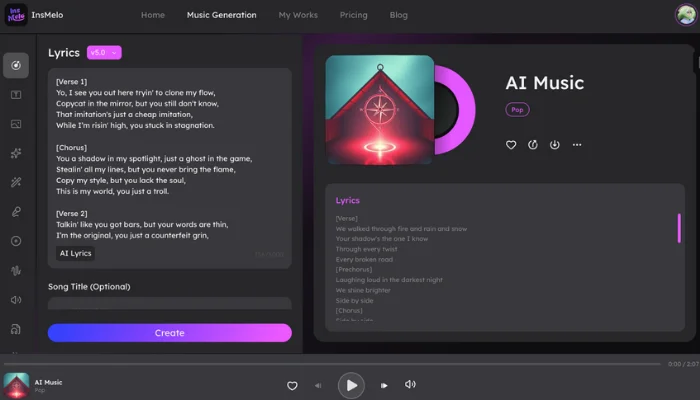
Follow these three steps to bring your words to life:
Step 1. Input Your Lyrics
Paste your finalized bars into the workspace to align the text with the rhythmic processing engine.
Step 2. Choose Your Music Style
Select the desired genre and instrumental mood from the available production library.
Step 3. Generate, Download & Share
Click the generate button to produce the audio, then download and share your finished track.
FAQ About Make a Diss Track
Conclusion
In 2026, learning how to make a diss track that goes viral is all about speed and precision. InsMelo AI music generator removes the technical barriers, allowing you to transform your best "ammo" into a professional-grade production in minutes.
If you've ever wondered how do you make a diss track that actually hits home, the secret lies in combining your unique story with AI-driven production. Ready to take the lead? Start your creative process with InsMelo now and let your bars do the talking.