You just generated a great 2-minute track on Suno AI, but you need a full song. How do you make the song longer? Knowing how to extend songs with Suno AI is the easiest way to finish your track without losing the vibe. In this guide, we break down the Suno AI song extension step-by-step and show you a better alternative!
What Does "Extending a Song" Mean in AI Music?
In the world of AI music generation, a song extension means adding new sections to an existing track while keeping the same style, tempo, and mood. Instead of looping the same 8 bars, AI analyzes your music and creates fresh music that feels perfect from the original.
This is a massive timesaver! In fact, many small creators credit Suno for saving 40% to 60% of their production costs, according to data compiled by Fueler. Now you can extend a track without hours of manual cutting, looping, and cross-fading.
For example, when you have a 30-second lo-fi beat for TikTok that you want to turn into a 2-minute loop for YouTube, the AI music extension will do it well in seconds, even if you have no background in sound engineering.
Can I Get an Extension Song with Suno AI?
If you are wondering, "Can I get an extension song directly in Suno?", the answer is a big yes. Suno has a built-in "Edit and Extend" feature to help you make a song longer.
What Suno AI Can Do for Song Extension?
When you use a Suno AI extend song feature, the platform lets you lengthen existing tracks by adding new sections such as verses, choruses, or outros while maintaining the original’s tempo, key, and style. It is not just about making a song longer, either. You can select a specific timestamp, introduce new lyrics, or change the style slightly. These song extender features give you a lot of flexibility:

How to Extend Songs with Suno AI (Step-by-Step)
Now that you know its powerful feature, it's your turn to experiment with the extension workflow by yourself. Here is a simple, no-nonsense guide on how to extend a song in Suno:
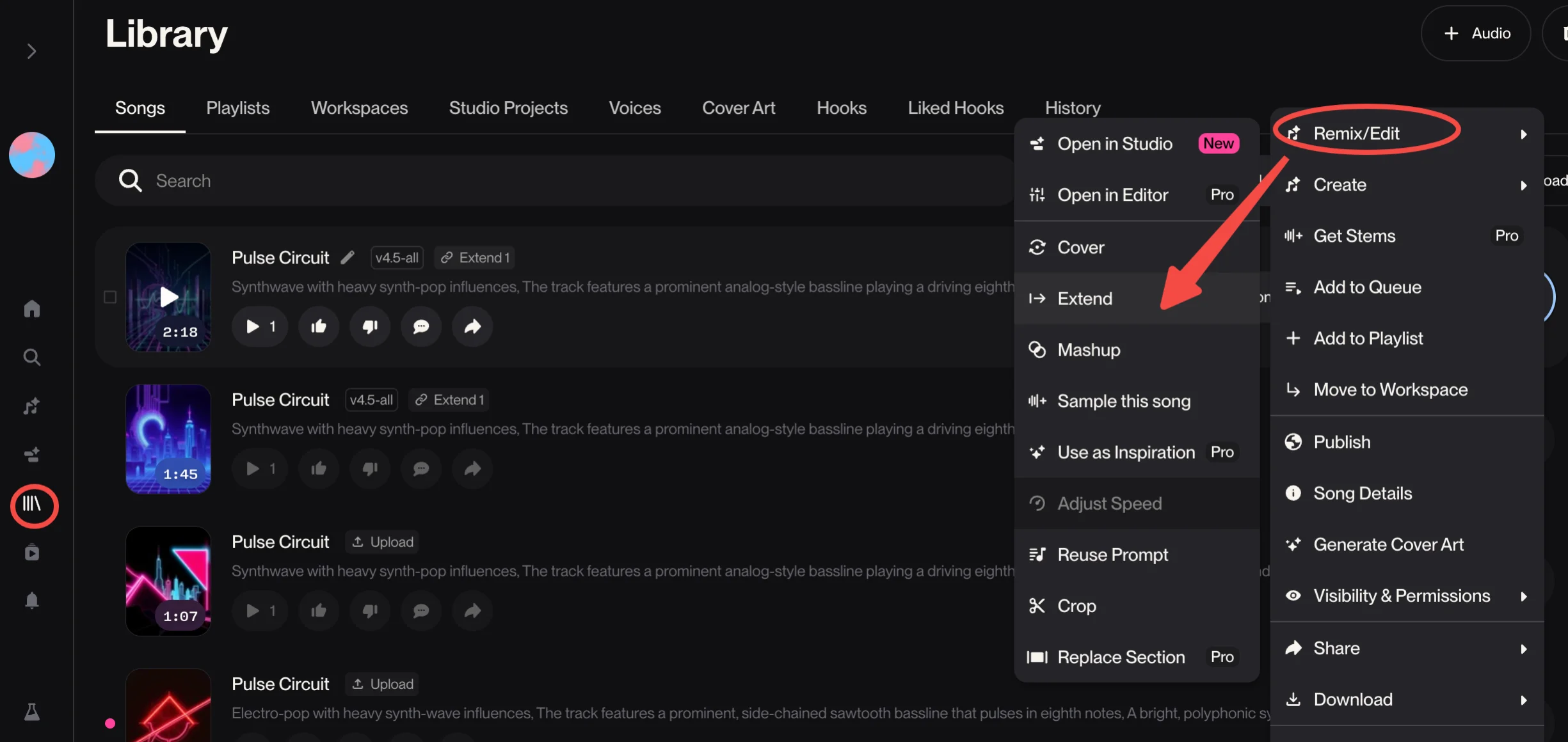
- Open Your Library: Log into Suno and go to your "Library" or "Create" page.
- Select Your Track: Find the song in the Suno Library and click the triple-dot (...) menu. You can upload an audio file or choose a Suno AI-generated song.
- Choose Extend: Select "Extend" from the Remix/Edit options.
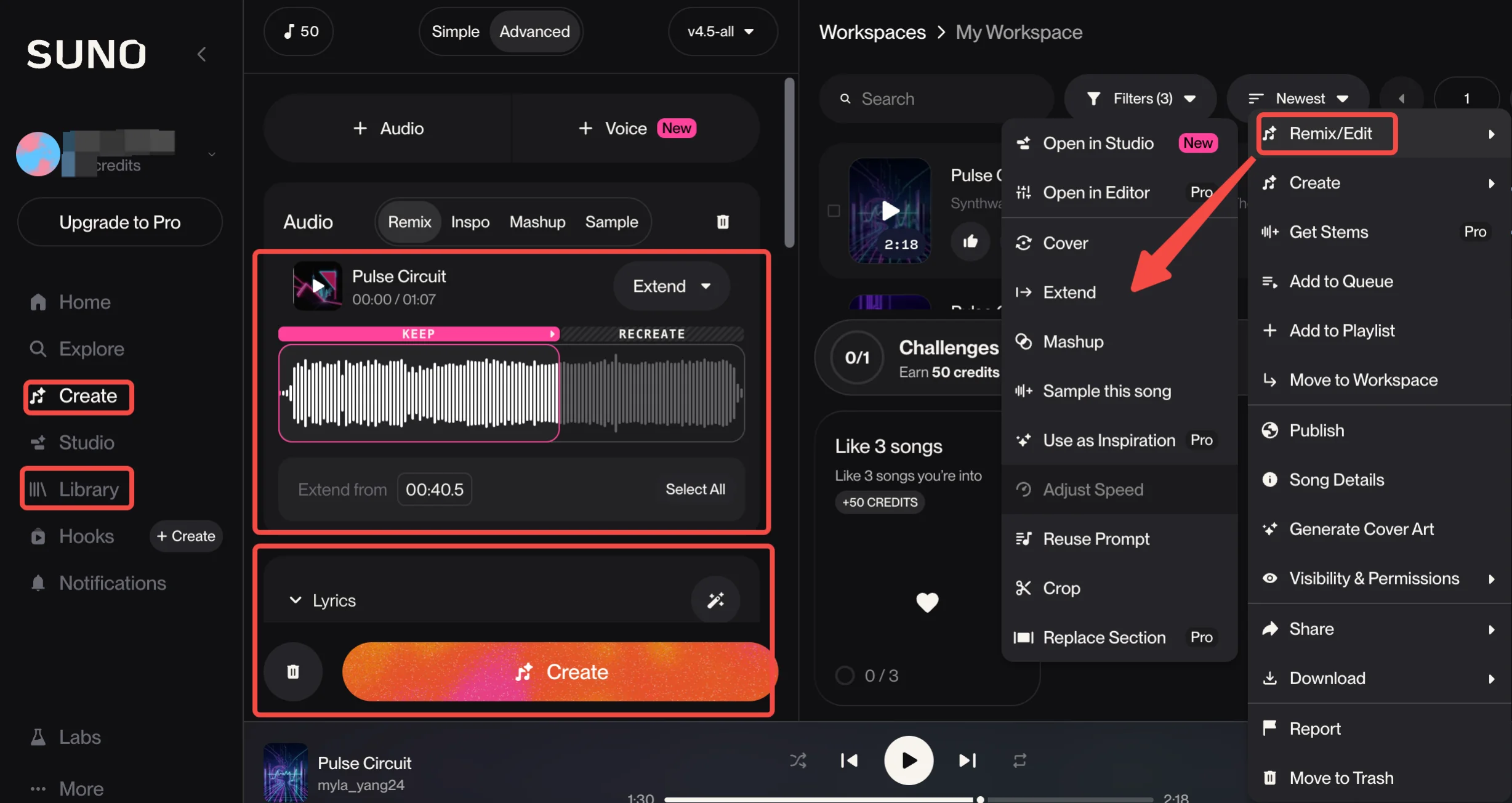
- Set Time & Lyrics: Choose the starting timestamp. You can also enter new lyrics or describe the style you want for the next section.
- Customize the Output (Optional): Fine-tune how the extension sounds. Change the vocal gender, switch between manual and auto lyrics, and adjust the sliders like Weirdness, Style Influence, and Audio Influence.
- Click "Create": Suno will create two new variations of the extended track. Listen to both and pick the one that fits best.
Note: Once you find an extension you love, click the three dots on that new clip and select "Get Whole Song" to merge the original and the new part into one continuous track.
Suno "Extend" Feature Not Working?
Even with a multi-billion-dollar valuation, Suno is not perfect. Many creators on Reddit and social media platforms like Facebook have reported frustrating moments where the AI music extension simply fails. Here are the most common scenarios where you might run into trouble:
- The "Style Drift" Bug: This is the most common complaint. Users often find that the extension sounds nothing like the original track, switching genres or singers mid-sentence.
- The 2-Second Loop: Sometimes Suno gets stuck. Instead of extending new music, it might just repeat the last two seconds of your song over and over.
- Credit Consumption Errors: There are frequent reports of generations failing to load while still consuming user credits. This often happens during peak server times when the AI is overloaded.
- Timestamp Sensitivity: If you pick a start time that is too close to a complex vocal riff, the AI can get "confused" and produce garbled audio.
If you are tired of fighting the interface or losing credits to failed music extensions, it might be time to look at a more stable AI music extender!
Suno's Alternative - InsMelo AI Music Extender
While Suno is a giant in the AI music space, many professionals prefer using a dedicated AI music extender for more direct control over the final sound. If you find Suno a bit too random or want to try another top-tier AI song-extension tool, InsMelo is an amazing choice.
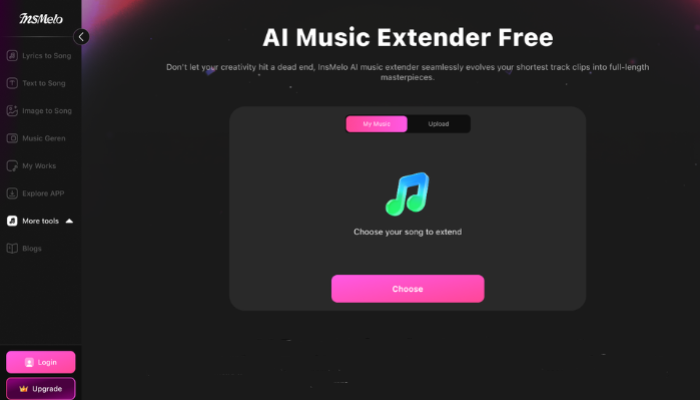
Why Choose InsMelo AI Song Extender?
InsMelo is designed for creators who want a clean, reliable AI song extension without the guesswork. It focuses on quality, precise control, and speed, making it easier to make a song longer naturally.
Using InsMelo AI music extender is simple and easy to lengthen your songs for anyone. Follow the 3 steps below, and you can get a high-quality, longer track.
How to Extend Music with AI
How to extend a song with AI - InsMelo? Before you start, make sure you’re logged into InsMelo and already have a track ready.
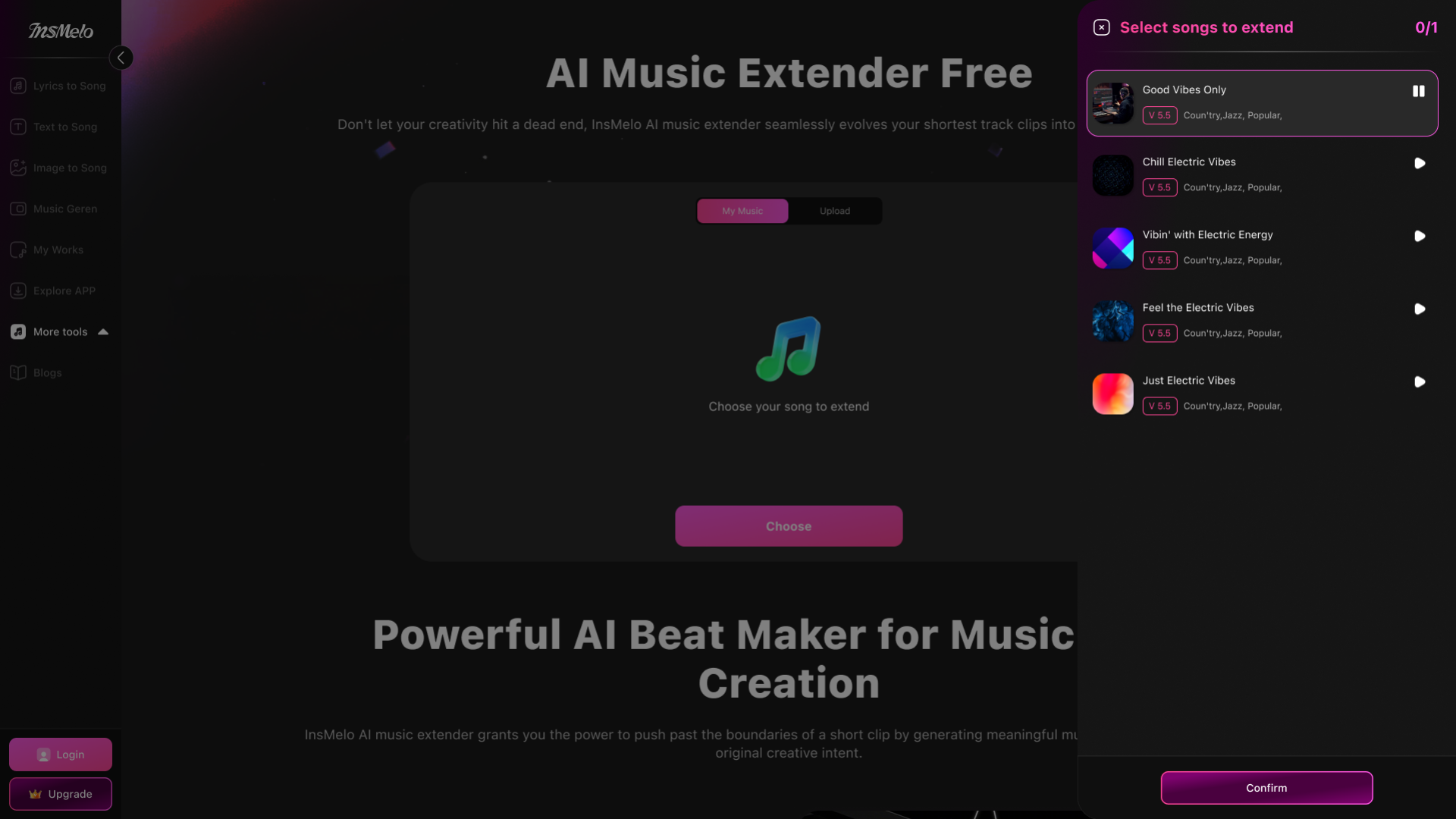
⚠️ Notes: If you don’t have any songs yet, go to the Lyrics to Song Generator first and create one.

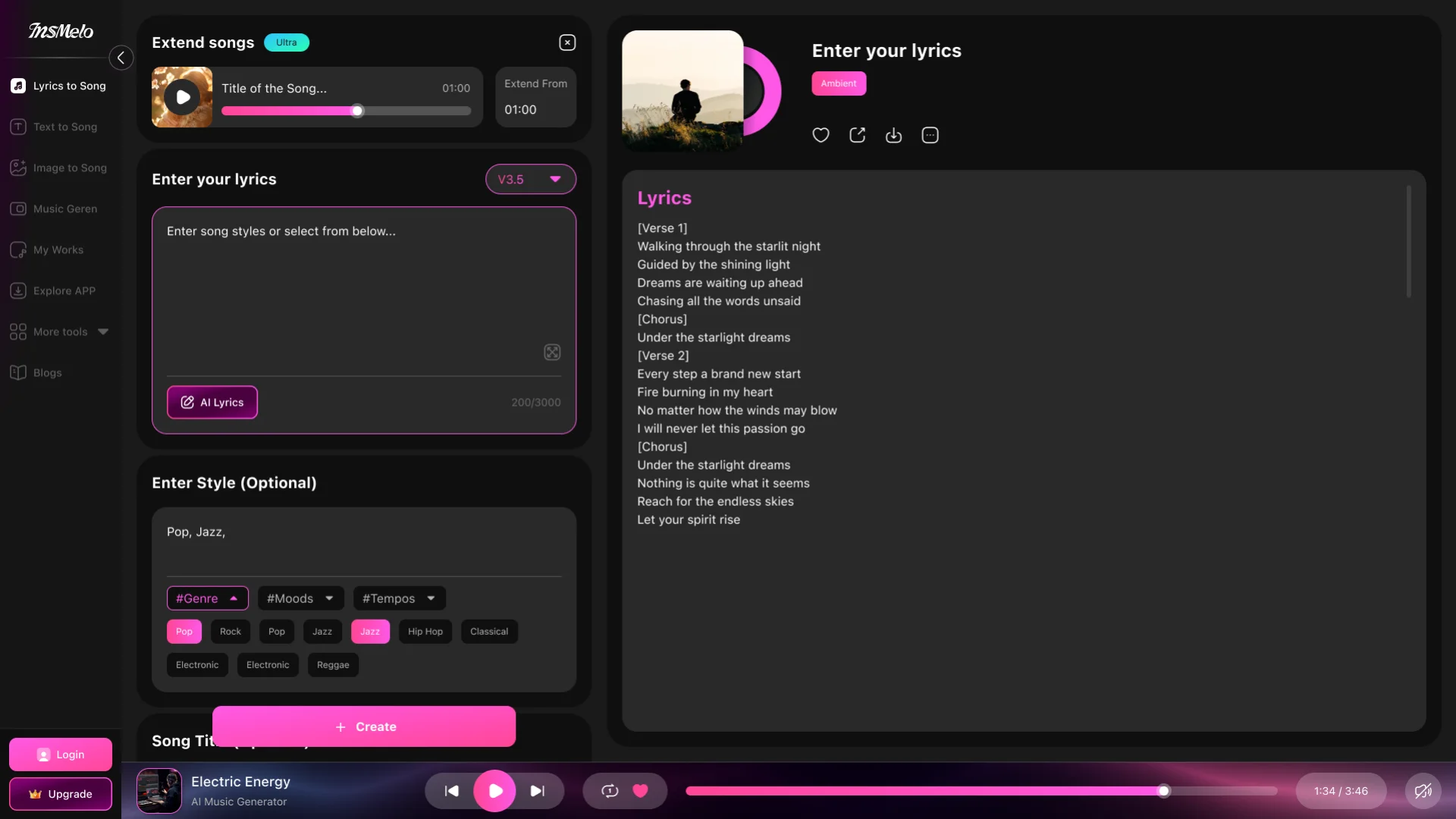
Bonus Tip: Besides using the standalone AI song extension tool, you can also click the three dots on any generated track inside InsMelo and use the built-in "Extend" feature directly.
Tips: How to Make A Song Longer Without Losing Quality
Learning how to make a song longer with AI is relatively simple; however, to ensure the extension doesn't sound jarring, the song's quality is everything. Here are a few practical tips to keep your track sounding professional:
- Listen for seamlessness: Before finalizing, check that the loop point sounds natural.
- Ensure minimum length: Some tools, like Adobe Audition, require the song to be at least 10 seconds long to analyze it properly.
- Use the "Get Whole Song" feature: In AI tools like Suno, ensure you use the "Get Whole Song" option to combine the original and the new extended part.
- Avoid over-looping: Do not stretch a short clip too many times, or the audio quality might drop.
FAQs about AI Song & Music Extension
Final Thoughts on Song Extension
In this guide, we've explored how to extend songs with Suno AI, highlighting its features and limitations. While Suno is a quick and easy tool for basic extensions, it may fall short in quality and consistency. For more precise control and high-fidelity results, InsMelo AI Music Extender offers a more reliable alternative.
Whether you’re a casual creator looking to lengthen a TikTok beat or a professional artist needing full control over your music’s evolution, AI song extension tools like Suno and InsMelo can help streamline your music production process. For best results, try both tools to find what works best to make a song longer and more natural.