AI has completely changed how beginners and creators make music beats. You no longer need expensive studio software, complicated workflows, or years of production experience to create professional-sounding beats. With advanced AI beat makers, anyone can generate drum patterns, melodies, basslines, and full instrumental beats in minutes. AI makes beatmaking faster, easier, and far more accessible for all.
In this guide, you’ll learn how to make music beats with AI step by step, discover the best AI beat maker, explore powerful prompt examples for different music beats, and pick up practical tips for creating great beats.
Before you start learning how to make beats using AI, it never hurts to familiarize yourself with some basic terms.
What Does AI Beatmaking Actually Mean?
AI beatmaking is a way to automatically create music beats using artificial intelligence. Instead of building every drum pattern and melody manually, users describe the type of beat they want, and the AI creates it quickly.
It is like having a professional producer sitting right next to you. You provide the creative spark, and the AI finishes the complex technical work. This is why the global generative AI music market is booming. Market.us reports show this industry is expected to grow by over 27% annually through 2032 as more people realize they can create music without a studio!
That does not mean AI replaces human creativity. The best AI beatmaking still comes from combining your ideas with AI speed and convenience.
What You Need Before Making Beats With AI
AI making a beat eliminates the need for a professional recording studio setup or expensive hardware. Still, a few basics help a lot before you start creating beats with AI.
A Computer or Phone: Most modern AI beat-making tools can run directly on your computer or mobile phone. Some support making beats online within your browser, while others are available as dedicated AI music apps. Consequently, whether you are using a computer or a phone, you can easily create beats. Computers typically offer more granular control, making it easier to edit and arrange tracks, whereas mobile phones are ideal for capturing sudden flashes of inspiration, allowing you to engage in spontaneous music creation anytime, anywhere.
A Good AI Beat Maker: Choosing the right AI beat maker matters a lot, especially for beginners. Look for a tool that is fast, easy to use, and capable of generating high-quality beats in different genres like hip hop, trap, lo-fi, EDM, and pop. A good AI beat maker should help you stay creative instead of overwhelming you with complicated controls.
A Clear Idea: AI works best when you give it a clear creative direction. Before generating a beat, think about the mood, genre, tempo, or energy you want.
Best AI Beat Maker - InsMelo
InsMelo stands out as one of the best AI beat makers because it keeps the beatmaking process creative, fast, and beginner-friendly. Instead of overwhelming users with complicated production tools, it helps turn simple inspiring ideas into polished beats within minutes.
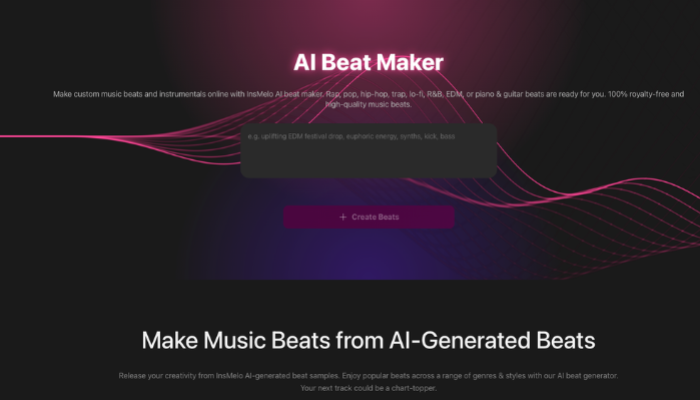
Here's what makes it a top choice for anyone learning how to make beats with AI:


How to Make Music Beats With AI
Creating AI beats is much easier than most users imagine. Follow these steps to make your own beat now with InsMelo AI.
Make Beats Online with InsMelo
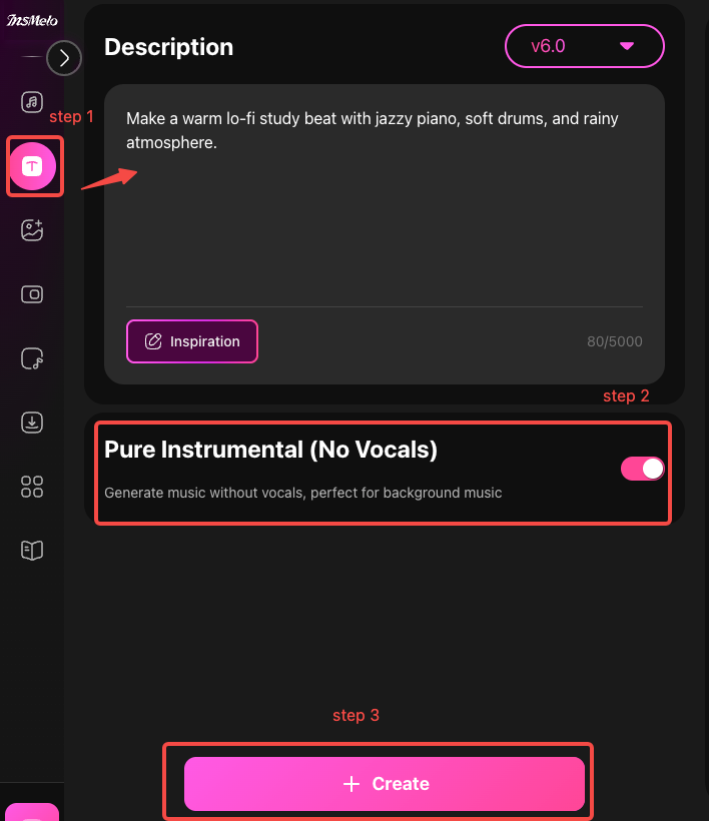
Here are some useful beat prompt examples for you. Have a try!
- Make a dark trap beat with deep 808 bass, sharp hi-hats, cinematic synths, and aggressive energy at 145 BPM that comes off like a Playboi Carti instrumental.
- Create a classic boom bap hip hop beat with dusty vinyl texture, soulful piano samples, punchy kick drums, and relaxed swing rhythm for a nostalgic old-school feel.
- Generate a festival EDM beat with energetic drops, bright synths, and strong bass for a massive crowd.
- Make a warm lo-fi study beat with jazzy piano, soft drums, and rainy atmosphere.
- Compose a dark UK drill beat with sliding basslines, rapid percussion, haunting bells, and tense street energy for an aggressive urban sound.
- Produce a funky drum beat with live percussion, groovy bass rhythm, crisp snares, and upbeat energy inspired by retro dance clubs.
Music example
⚠️ If you also want to create full songs later, an AI Song Generator can help you make a complete song with vocals and lyrics.
Bonus: How to Make Great Beats with AI
Making good beats may take practice, even with AI. However, here are some practical tips from top creators to help you create hit beats.
Be Specific with Your Prompts. Instead of typing something broad like "rap beat", describe the exact sound you want, such as "make 90 BPM sad lo-fi hip hop beat with mellow piano, dusty drums, and late-night mood." Detailed prompts usually produce cleaner and more accurate results.
Use Track Separation. If you find that certain tracks within a generated beat are excellent, but you are unsatisfied with one or two specific tracks, you can separate the individual instruments. Then mix and match different musical segments to craft a truly unique beat.
Combine AI Tools Creatively. Many producers use stem splitters or sample generators to pull vocals, drums, or melodies from existing songs, then blend them with AI-generated beats. This way often creates richer and more unique productions.
Focus on Customization and Refinement. Most first-generation AI beats sound decent, but rarely perfect. Producers usually regenerate several times, swap instruments, and trim sections before the beat starts feeling polished.
Undoubtedly, AI helps accelerate the production of music beats, but making great AI beats requires your creativity and practice.
FAQs about Using AI to Make Beats
Conclusion
AI beatmaking lowered the barrier to music creation in a huge way. With the right prompts, a clear creative direction, and a beginner-friendly AI beat maker like InsMelo, anyone can make music beats with AI online in minutes.
Start creating your own beats today with the help of InsMelo!